Key Points
- Digital clutter fuels physical disorganization through cable tangles, misplaced devices, and inefficient workspaces.
- Systematic management of files, cables, and devices reduces stress while improving physical cleanliness.
- A structured process that covers inventory assessment, cable management, file organization, and regular maintenance delivers lasting results.
- Affordable tools such as cable sleeves, labeling systems, and cloud storage transform both digital and physical environments.
- Routine reviews and consistent habits prevent clutter from returning.
Technical Background
Digital clutter consists of disorganized electronic files, tangled cables, outdated devices, and neglected data that occupy mental and physical space. Every device carries a physical footprint, and each charging cable or power adapter adds to visible disorder. When digital systems lack management, the physical side of technology spreads across desks, countertops, and living areas.
Assessment: Understanding Current Conditions
Evaluate the current state of digital and physical setups before beginning. This step establishes a baseline and helps set priorities.
- Create a device inventory that lists phones, tablets, computers, routers, and smart home hubs. Note active items, backup units, and obsolete equipment.
- Conduct a cable audit by gathering every cord, adapter, and charger. Group items by function and connector type.
- Review file storage across cloud accounts, local drives, and external devices. Identify duplicates, outdated material, and unused folders.
- Observe workspaces for visible signs of disorder such as tangled cords or scattered peripherals.
Documenting these observations produces a clear picture of the task ahead.
Planning Phase: Tools and Safety Measures
Treat digital decluttering as a structured home project. Preparation supports sustainable outcomes.
Required Tools and Materials
- Cable ties, Velcro straps, or reusable twist ties
- Cable sleeves or raceways for concealment
- Label maker or masking tape with a permanent marker
- Small storage bins or drawer organizers
- Surge protectors with USB ports
- External hard drive or cloud subscription for backups
- Microfiber cloths and compressed air for cleaning
Timing and Workflow
Schedule separate sessions for physical and digital tasks. Start with cables and devices, then move to files and accounts. Avoid splitting attention between cleaning and sorting.
Safety Measures
- Unplug devices before moving or cleaning them.
- Prevent outlet overloads on extension cords.
- Keep electrical parts away from moisture.
- Store backup drives in secure locations.
Implementation: Step-by-Step Actions
Begin with Physical Clearing
Remove all devices, cables, and accessories from the workspace. Wipe surfaces and vacuum dust from behind furniture. Physical cleanliness supports mental clarity before organized reinstallation.
Sort and Label Cables
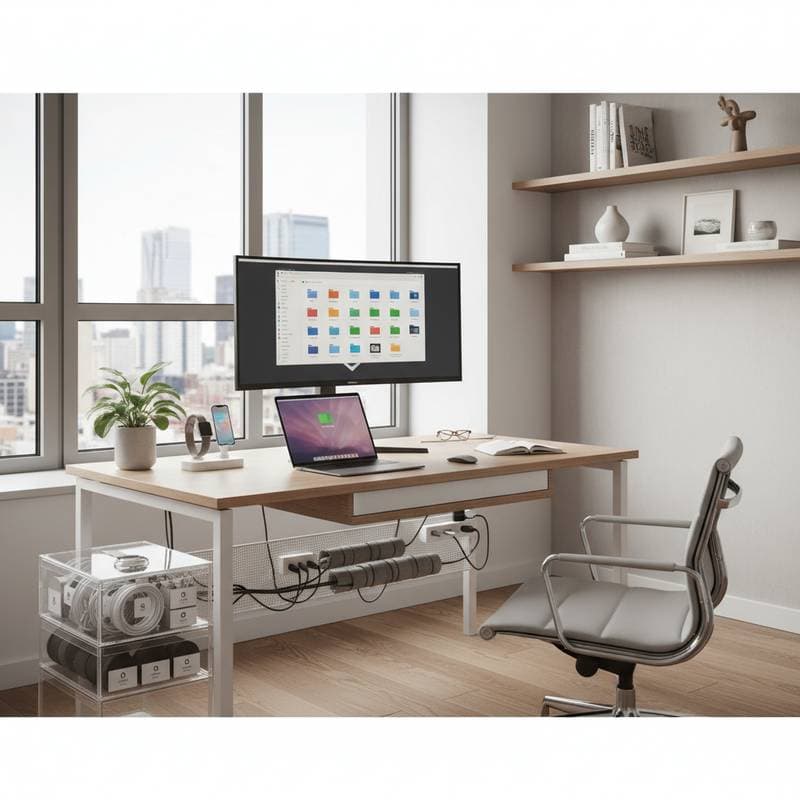
Group cables by charging, audio, data transfer, and power functions. Label each item with its device name or purpose. Bundle cords with ties or sleeves and route longer runs through raceways or under-desk trays.
Establish Charging Zones
Designate one or two spots for charging. Use multi-port chargers or docking stations to reduce scattered cords and eliminate searches for adapters.
Manage Device Storage
Place rarely used devices in labeled bins. Keep daily electronics within reach. Reset and recycle older gadgets through certified e-waste programs.
Clean and Inspect Equipment
Wipe screens and vents with microfiber cloths. Replace frayed cables and check plugs for overheating signs. These checks improve safety and performance.
Organize Digital Files
Back up all data first. Build a folder structure that matches household needs, such as Home Projects, Finances, Personal, and Work or School. Delete duplicates and empty the recycle bin.
Implement Cloud and Backup Systems
Store active files in the cloud and archives on external drives. Schedule automatic backups to protect data and keep devices orderly.
Streamline Email and Notifications
Unsubscribe from unused newsletters. Create labeled folders and filters for remaining messages. Disable nonessential notifications to lower digital noise.
Quality Assurance: Verifying Results
Apply checkpoints to confirm progress.
- Conduct a visual inspection to confirm clear surfaces and hidden cables.
- Test each device to verify connections.
- Review folders for logical structure and quick access.
- Confirm backups by restoring a test file.
- Perform a safety audit on cords, outlets, and ventilation.
Maintenance: Sustaining Order
Adopt ongoing habits to preserve results.
- Review the workspace weekly for stray items.
- Clean up downloads and new files monthly.
- Inspect cables and surge protectors quarterly.
- Evaluate systems and recycle outdated technology annually.
Consistent actions stop new clutter from forming.
Putting Organization into Practice
Digital order directly shapes physical cleanliness. Methodical attention to devices, cables, and files keeps surfaces clear and living spaces calmer. Begin with one area such as a desk or laptop files. Apply labeling and maintenance routines, then expand across the home. Improved focus and smoother workflows follow naturally.